
- v1.3 added pairing_bench.sh to measure and depict the processing speed of the bilinear map, or pairing, (README).
- v1.2 and newer support FIPS providers.
- A list of FIPS-validated versions and their corresponding information can be found in the middle of this link.
- v1 and newer support post-quantum cryptographies.
-
Install necessary commands:
-
On Debian/Ubuntu:
sudo apt install gnuplot git openssl make gcc gcc-mingw-w64-x86-64 cmake ninja autoconf perl
opensslis for using the openssl command in the PATH.makeandgccare for makingopensslcommands from the source code.gcc-mingw-w64-x86-64is for making openssl.exe with Mingw-w64.cmakeandninjaare for buildingoqsproviderandliboqs.autoconfis for makingconfigurefromconfigure.acforLibreSSLgit repo.perlis for executing a FIPS provider (except for Mingw-w64).
-
On macOS
-
Command Line Tools by entering on a terminal a command it provides, such as
gcc
-
Install Homebrew, then
brew install gnuplot coreutils mingw-w64 cmake ninja autoconf automake perl
coreutilsis needed to userealpathcommand.mingw-w64is for buildingopenssl.exewithMingw-w64.cmakeandninjaare for buildingoqsprovider,liboqsand so on.autoconfis for makingconfigurefromconfigure.acforLibreSSLgit repo.automakeis for buildingLibreSSL.perlis for executing a FIPS provider (except for Mingw-w64).
-
-
For post-quantum cryptographies:
- Install Python 3 and some of its external libraries and packages, such as
pyyamlandtabulate.
- Install Python 3 and some of its external libraries and packages, such as
-
-
Download scripts:
git clone https://github.com/KazKobara/plot_openssl_speed.git cd plot_openssl_speed -
Help and usage:
./plot_openssl_speed_all.sh -h
./plot_openssl_speed.sh -h
Flowcharts of these scripts.
-
To compare with PQC data on Web:
Install Node.js and run:
cd ./data_from_web/
npm install --save puppeteer
npx @puppeteer/browsers install chrome@stable
cd ..
-
Run the following scripts depending on what to depict.
./plot_openssl_speed_all.sh -s 1
- The option '
-s 1' is to set the measuring time to 1 second to speed up and grab the rough trend. Remove it for accurate measurements.- The following graphs are obtained without '
-s 1'.- The script ignores '
-s 1' against LibreSSL since itsopenssl speeddoes not support-secondsoption and causes an error at least up to 4.10.0.
The measurement results (graph files *.png and their data files *.dat) are stored in the directories displayed at the end of the output message as follows:
Results are in:
  ./tmp/default_openssl_1.1.1f/graphs/
For WSL (Windows Subsystem for Linux),
/home/directory ofUbuntu-20.04is accessible using File Explore on Windows OS with the following address:
\\wsl$\Ubuntu-20.04\home\
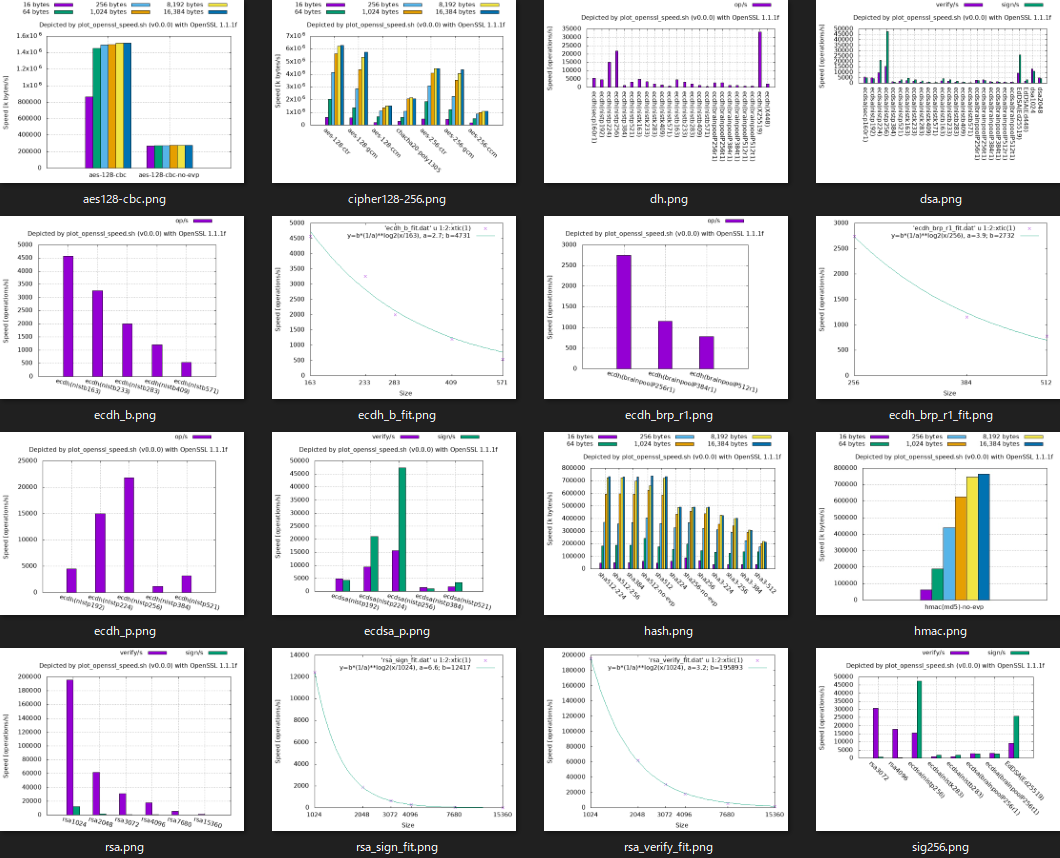
Example of graph list (openssl 1.1.1f in PATH):
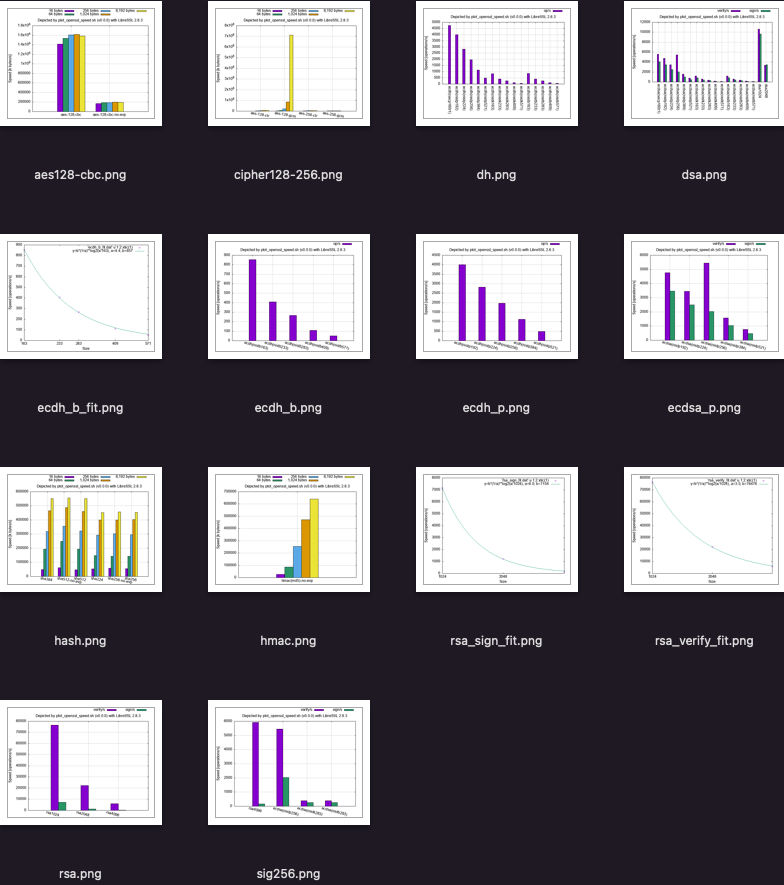
Example of graph list (LibreSSL 2.8.3 in PATH):
The following command graphs the speed of openssl command compiled from the source code taged as openssl-3.0.7, and openssl.exe command cross-compiled by Mingw-w64 (x86_64-w64-mingw32-gcc):
./plot_openssl_speed_all.sh -s 1 openssl-3.0.7 openssl-3.0.7-mingw
- By adding
-mingwafter the tag-name, openssl.exe is cross-compiled by Mingw-w64, and then the results are added on WSL. The other computational environment requires Windows binary executable environment.- openssl-3.0.5, shown as an example below, includes vulnerabilities. So use a fixed or latest OpenSSL (or its alternative).
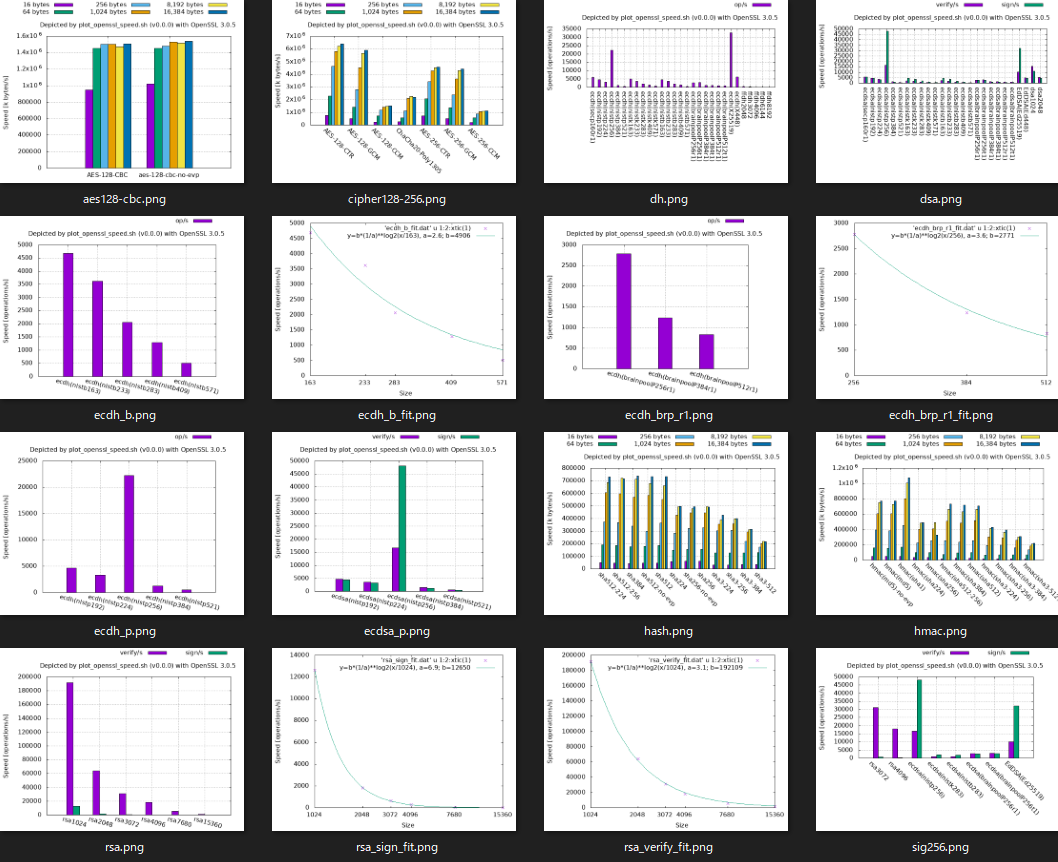
Example of graph list (openssl-3.0.5 from source):
If the openssl command is with liboqs and oqs-provider, plot_openssl_speed_all.sh v1.0.0 and newer automatically measure and depict the speed of post-quantum algorithms, too. It also provides comparison graphs of sizes and processing cycles published on [pq-sig-zoo] and [ebats].
Give the command argument openssl-type as follows,
to measure and depict the speed of openssl with oqs-provider and liboqs tagged by openssl-3.3.1, 0.6.1, 0.10.1, respectively.
./plot_openssl_speed_all.sh -s 1 openssl-3.3.1-oqsprovider0.6.1-liboqs0.10.1For their master/main branches:
./plot_openssl_speed_all.sh -s 1 master-oqsprovidermain-liboqsmainAs of v1.0.0,
plot_openssl_speed_all.shdoes not acceptopenssl-typecombiningliboqs<tag>-oqsprovider<tag>with-mingw.
The processing speed may vary depending on the environment. The above and the following graphs show the results in the following computational environment.
Be careful not to use broken or insufficient-security-level algorithms even if they are faster than the other.
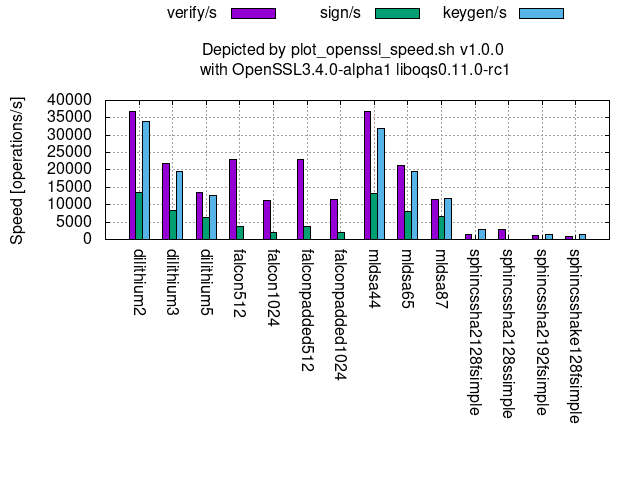
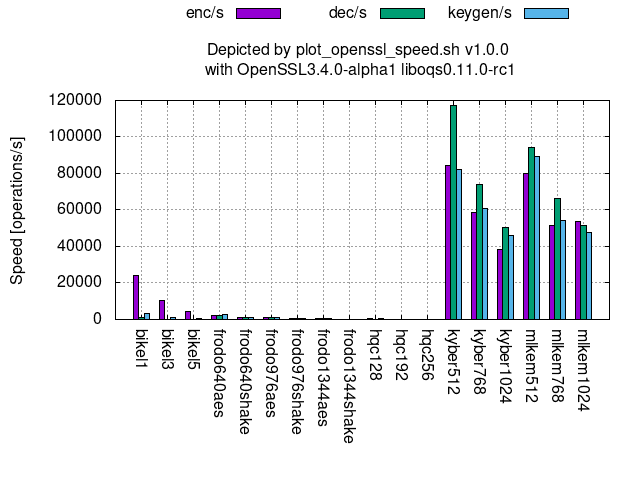
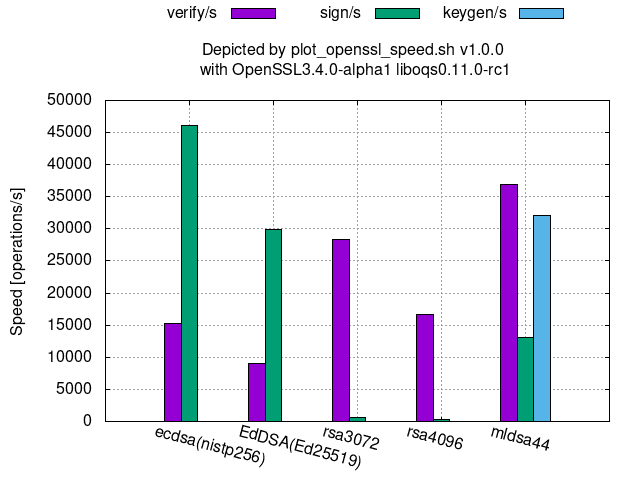
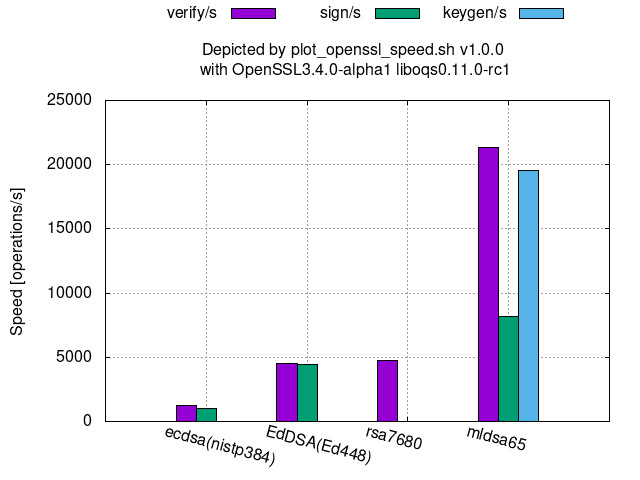
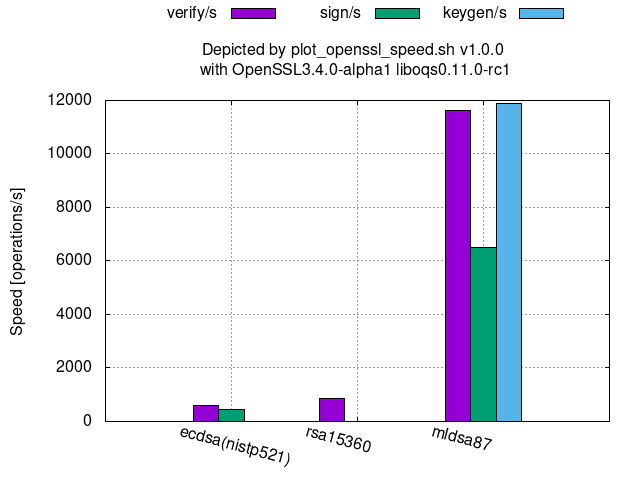
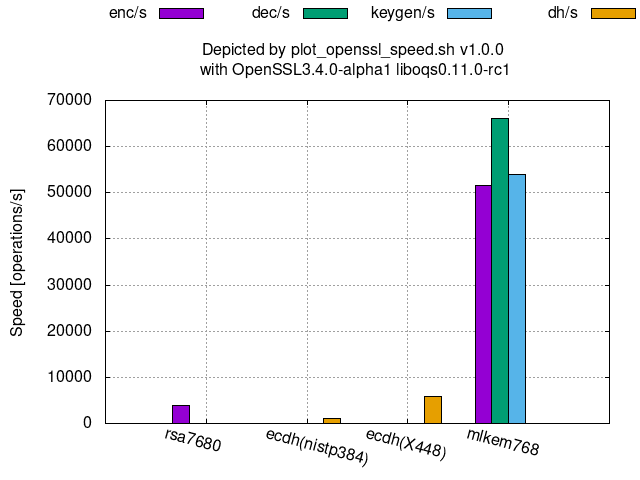
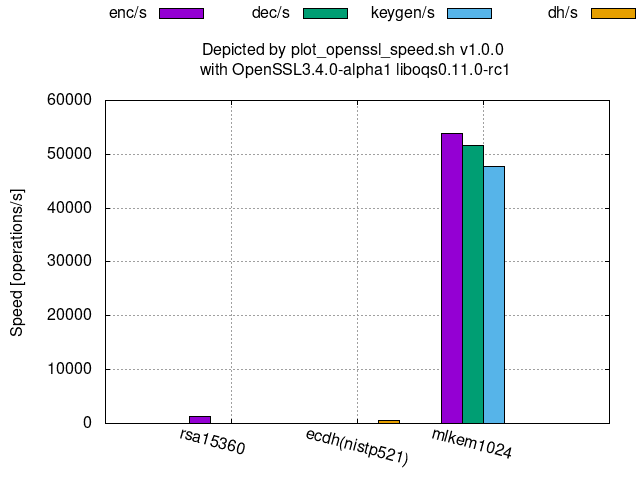
The followings graphs show the processing speeds of PQC's available at OpenSSL 3.4.0-alpha1 with oqs-provider 0.6.1 and liboqs 0.11.0-rc1.
Digital signature:
KEM (Key Encapsulation Mechanism):
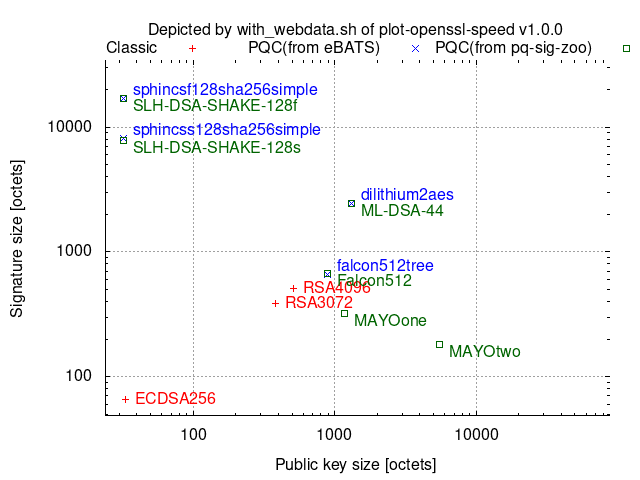
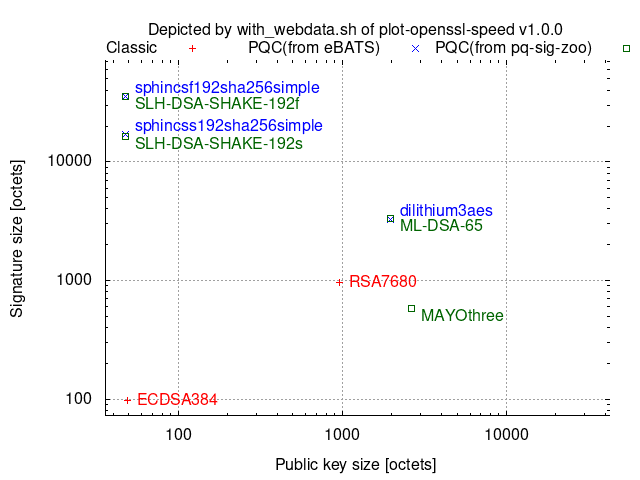
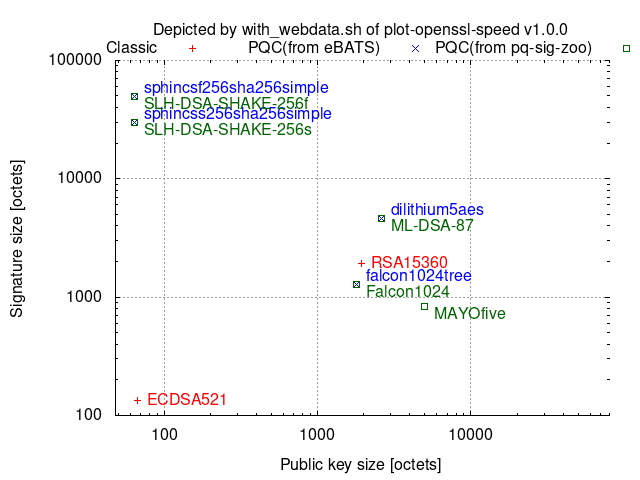
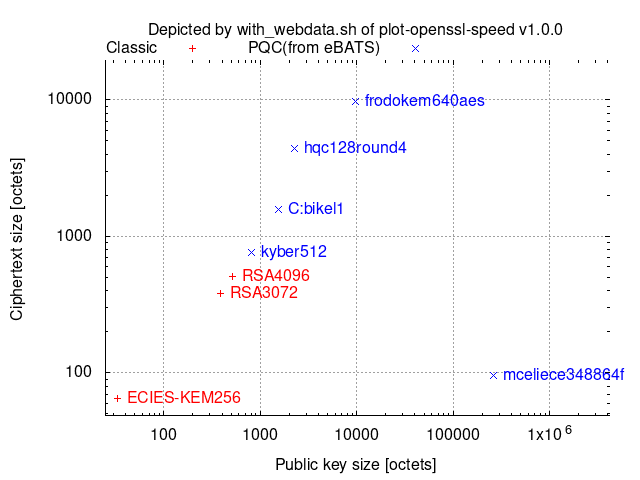
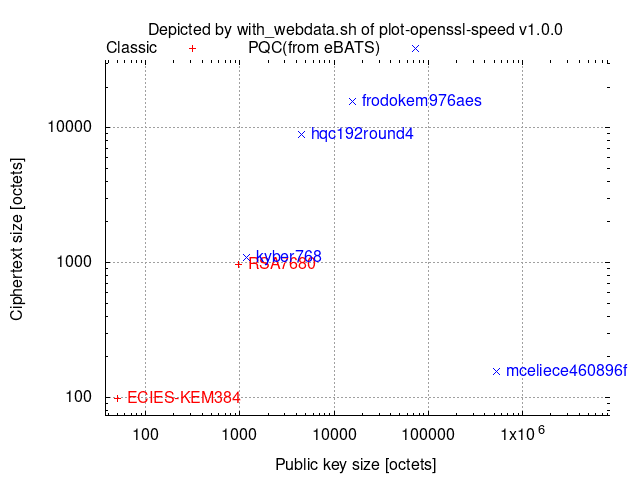
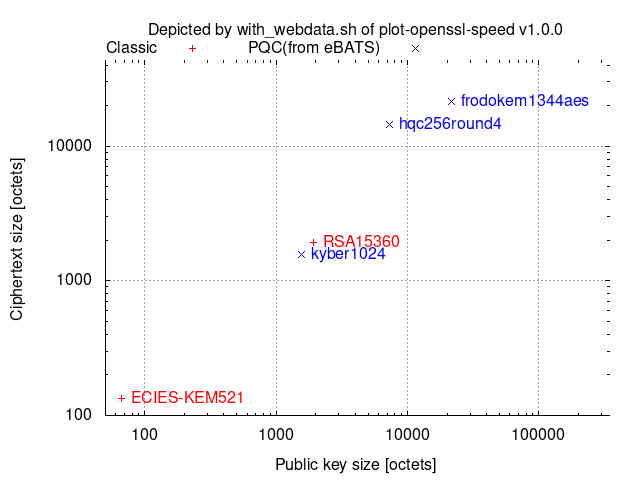
with_webdata.sh depicts ciphertext/signature sizes vs. public-key/signature-verification-key sizes as scatter graphs by collecting the necessary size data from [pq-sig-zoo] and [ebats] and then combining them with other provided data.
Comparison among 128-(classical-)bit security algorithms:
Comparison among 192-(classical-)bit security algorithms:
Comparison among 256-(classical-)bit security algorithms:
One operation of ECDH includes one scalar multiplication to the generator/base-point and one scalar multiplication to a random point.
Comparison among 128-(classical-)bit security level algorithms:
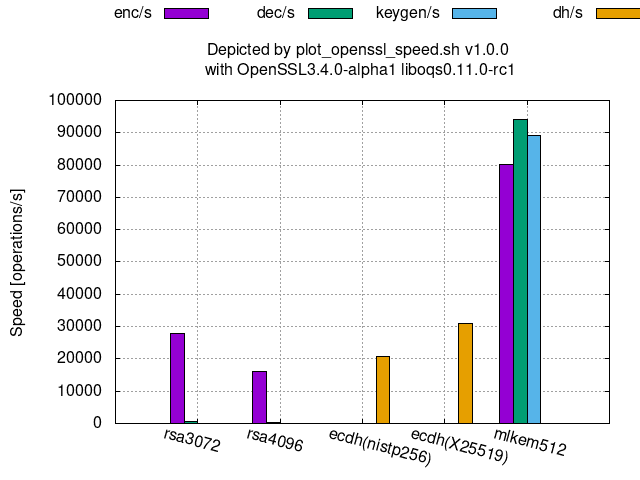
Comparison among 192-(classical-)bit security level algorithms:
Comparison among 256-(classical-)bit security level algorithms:
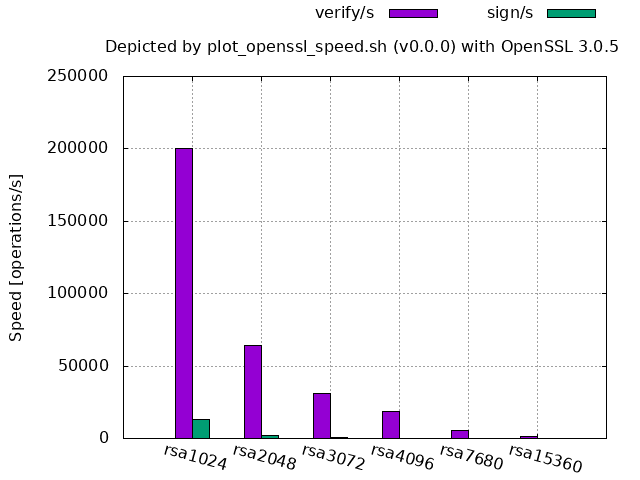
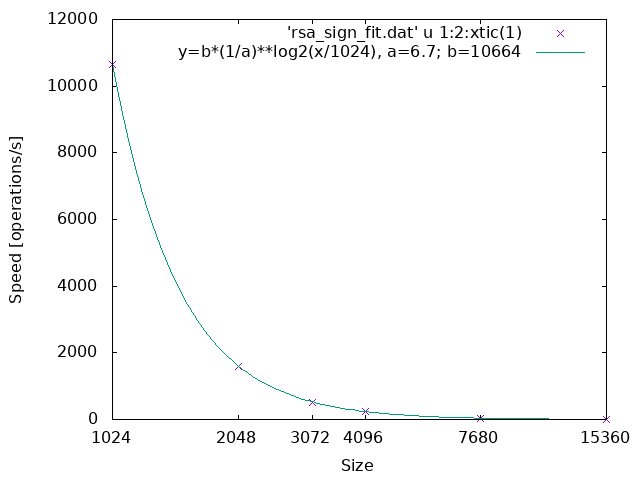
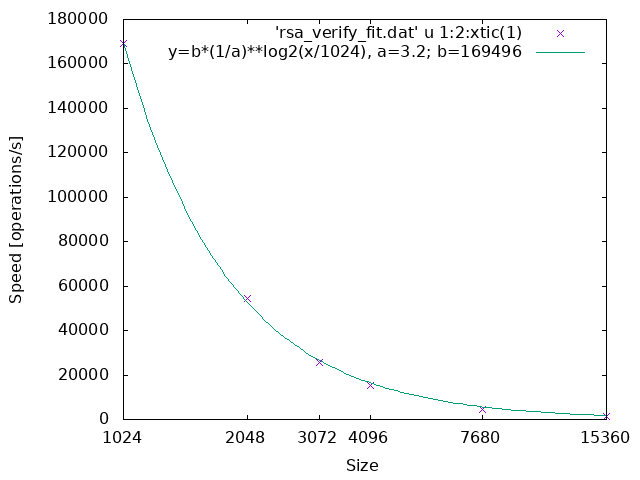
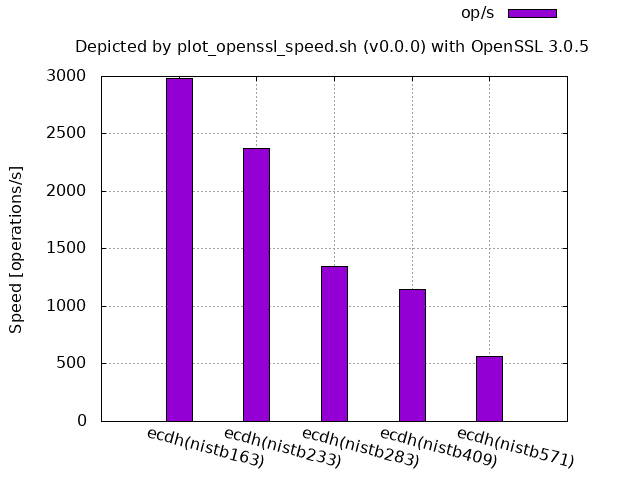
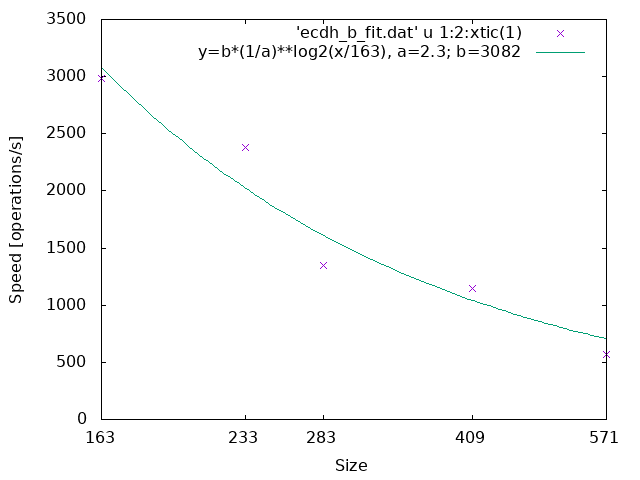
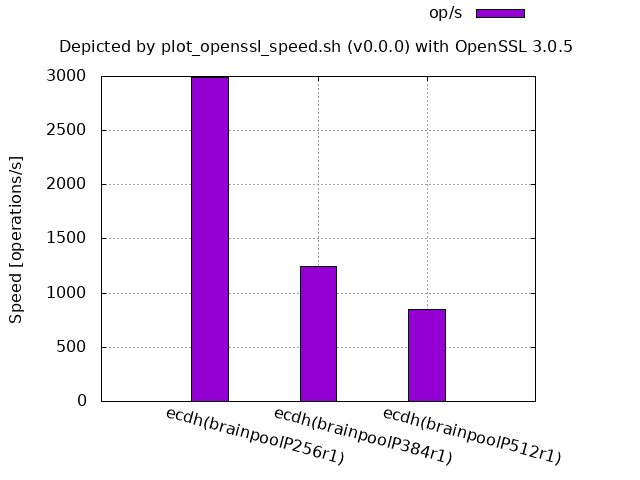
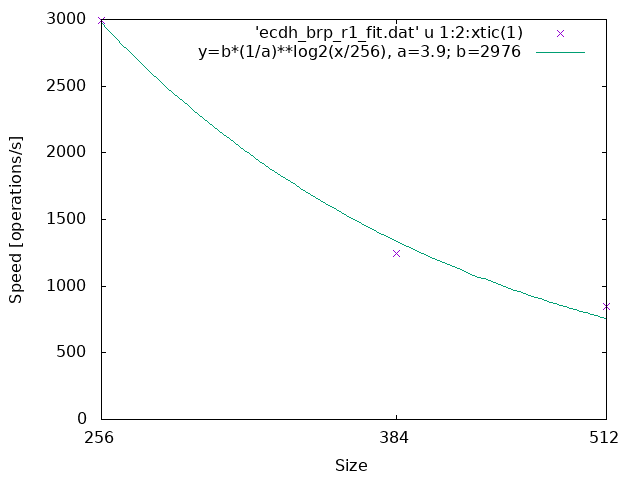
Theoretically, the larger the size, the slower the processing speed, but in practice, some counterexamples exist.
The first examples show the former cases.
The parameter a in the line graphs denotes the reduction rate of the processing speed when the size becomes twice where the size is the bit length of the underlying finite field or ring.
RSA:
ECDH (NIST curve over an extension field of Z2):
ECDH (Brainpool r1 over a prime field):
The following figures show the counter examples.
ECDSA/ECDH (NIST curve over a prime field, OpenSSL 3.0.5 source code built and run on Ubuntu 20.04):
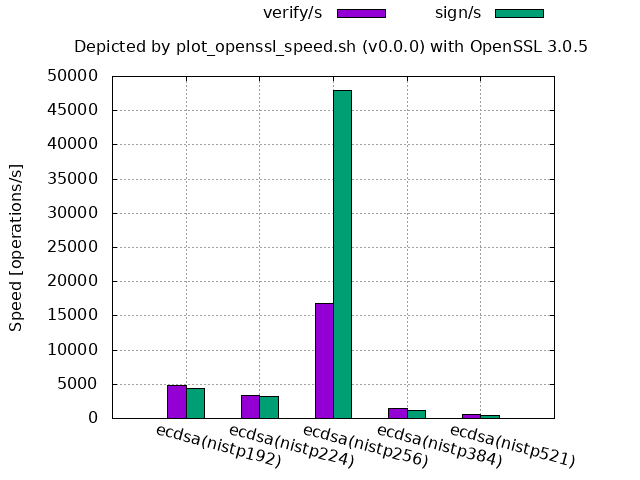
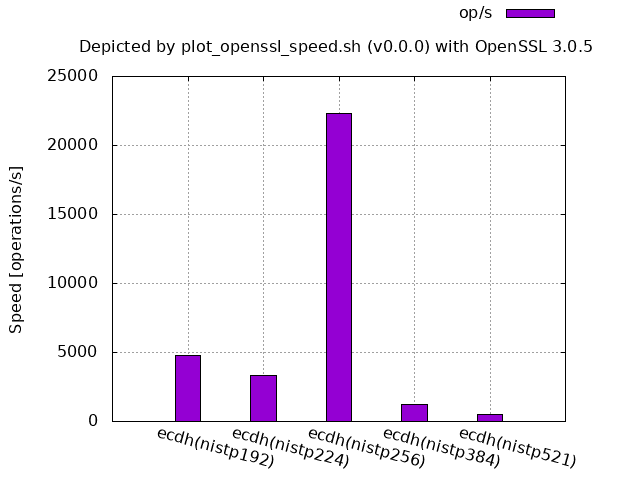
For OpenSSL,
-
256-bit is by far faster than the smaller sizes 192-bit and 224-bit.
- It does not mean that 256-bit is exceptional in theory, but the assembly implementation has tuned it up, since adding
-UECP_NISTZ256_ASMto./configwill remove this advantage. - The processing speed of 384-bit and 521-bit may also be improved in the future depending on the necessity.
- It does not mean that 256-bit is exceptional in theory, but the assembly implementation has tuned it up, since adding
ECDSA/ECDH(NIST curve over a prime field, OpenSSL 3.3.2 of Homebrew on macOS 14.6):
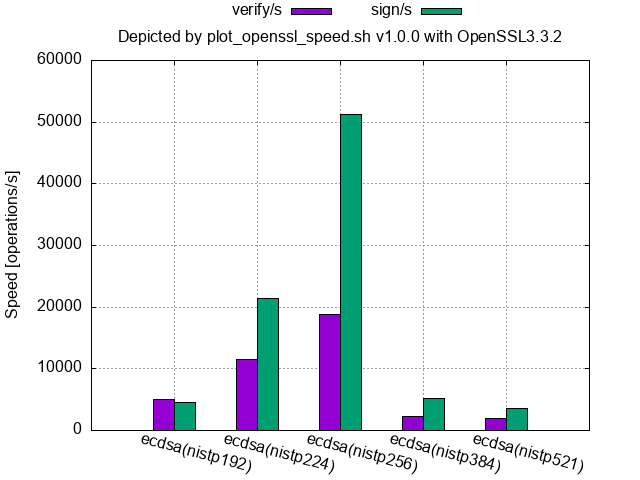
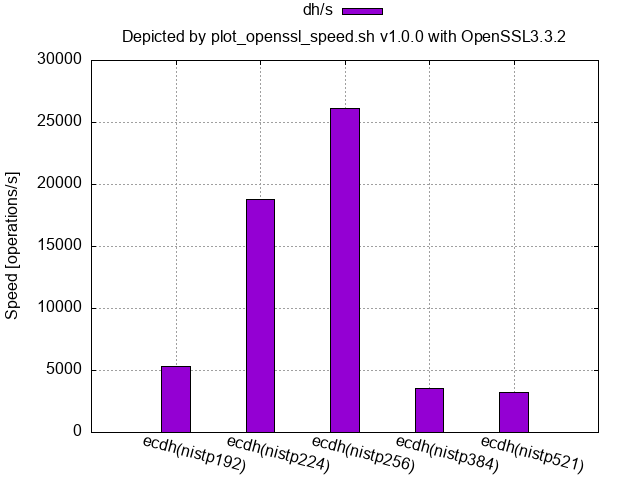
- Homebrew's OpenSSL (at least 3.3.1 and 3.3.2 for macOS) and the binary OpenSSL 1.1.1f shipped with Ubuntu 20.04 have tuned up the NISTP224 curve a little in addition to the NISTP256 curve.
ECDSA (NIST curve over a prime field, LibreSSL 2.8.3 shipped with macOS 12.4):
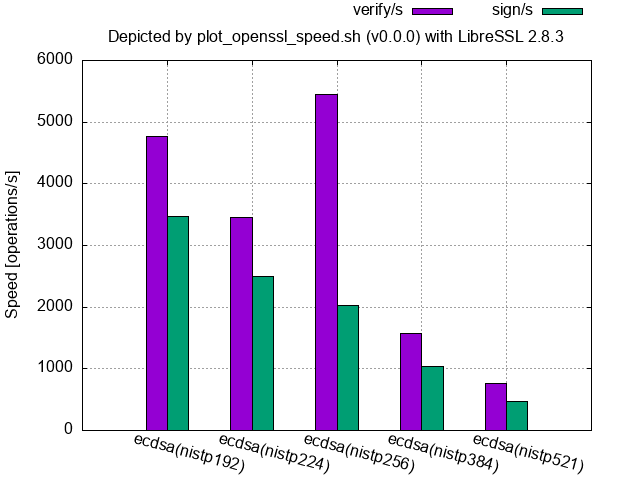
For LibreSSL,
-
only the verification speed of 256-bit is faster than the other sizes including the smaller sizes, and
-
the signing speeds are slower than their verification ones (from 2.8.0 to at least 3.9.2).
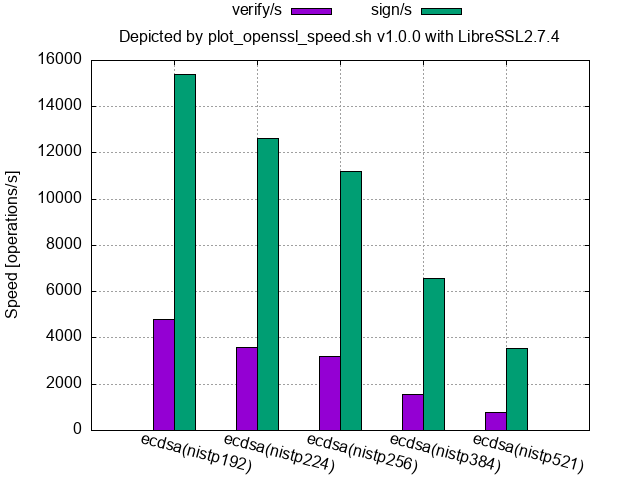
- In general, signing speeds are faster than their verification speeds for ECDSA and DSA, and libressl had held this propertiy up to 2.7.4 as shown in the following figure.
- 2.8.0 release note says "Added a blinding value when generating DSA and ECDSA signatures, in order to reduce the possibility of a side-channel attack leaking the private key."
ECDSA(NIST curve over a prime field, LibreSSL 2.7.4 source code built and run on macOS 15.0):
API difference:
-
When the script invokes the crypt-algorithm with a low-level API, it appends
-no-evpto the crypt-algorithm name. No difference between APIs.Low-level APIs are deprecated at OpenSSL 3.
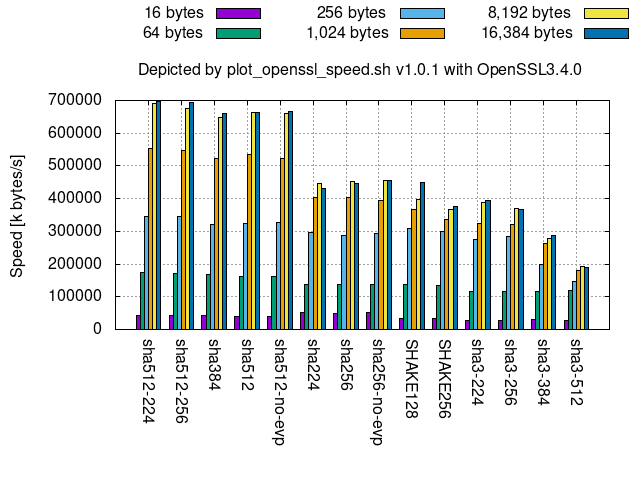
Comparison among truncated versions:
sha512-224,sha512-256, andsha384are truncated versions ofsha512, so they show almost the same performance.- In the same way,
sha224is a truncated version ofsha256, so they show almost the same performance, too.
Comparison between sha256 and sha512:
- The speed for 16 bytes, or more generally 512-1-64=447 bits (or 55 bytes) or less, shows the speed of one compression function in both
sha256andsha512. Hence, the figure indicates that onesha256compression function is faster than that ofsha512. - For more bytes,
sha512is faster thansha256since the number ofsha512compression-function executions is around half ofsha256where the input bit length ofsha256andsha512compression functions are 512-bits and 1024-bits, respectively.
SHA-3 and SHAKE:
- As shown in the right of the figure, the larger the size, the slower the message processing speed among
sha3-*andSHAKE. - Compared to
SHA-2,SHA-3(sha3-*) are slower due to the larger security margin [kec17].
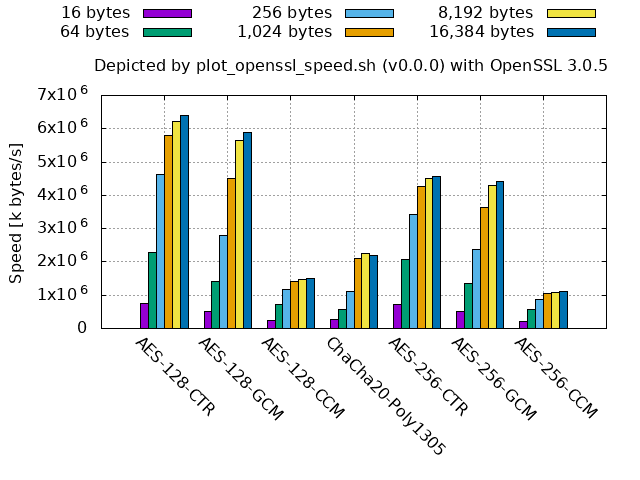
In theory:
- Both
AES-*-GCMandAES-*-CCMmust be slower than the same key-lengthAES-*-CTRsince they areAES-*-CTRwith their integrity check. AES-*-CCMmust also be slower thanAES-*-CBC, which is shown in the upper left corner in the above graph list, since the integrity check ofAES-*-CCMuses the similar algorithm toAES-*-CBC.AES-128-*must be around 1.4 times faster thanAES-256-*since the number of their rounds are 10 and 14, respectively.
Counter example:
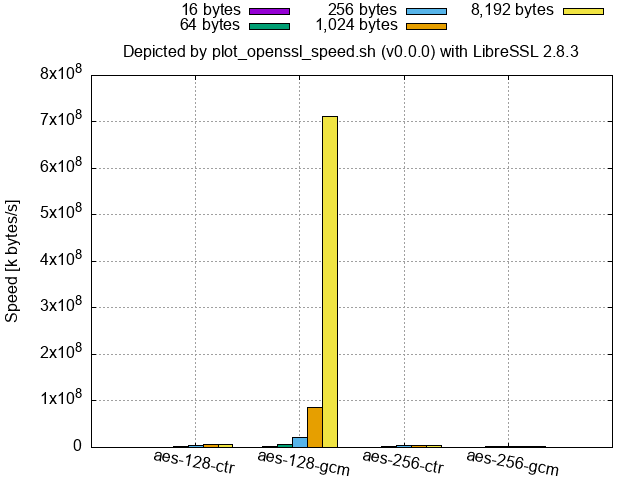
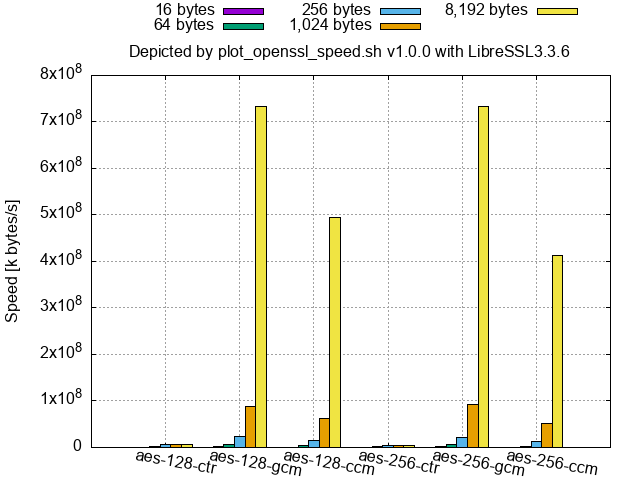
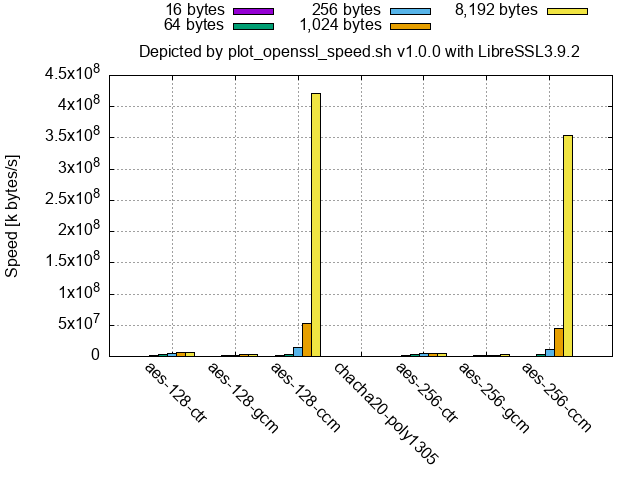
- LibreSSL (at least 2.9.1/3.0.0 and newer, and the binaries of 2.8.3 and 3.3.6 shipped with macOS) shows that a part or the whole of
aes-(128|256)-gcmandaes-(128|256)-gcmis by far faster than the others for large-size inputs as follows.
LibreSSL 2.8.3 (shipped with macOS 12.4):
LibreSSL 3.3.6 (shipped with macOS 14.6):
LibreSSL 3.9.2 (from the source code):
-
By comparing
aes128-cbc.pngat the left-top corner of "Example of graph list,"aes-128-cbc-no-evp(128-bit key AES with the legacy mode of operation, CBC) called by way of the low-level API is slower in OpenSSL 1.1.1 than the high-level API and OpenSSL 3's low-level API.- LibreSSL (at least up to 4.0.0) shows the similar results as OpenSSL 1.
- Low-level APIs are deprecated at OpenSSL 3.
Below is a speed comparison among hash-(or Keccak-)based MACs.
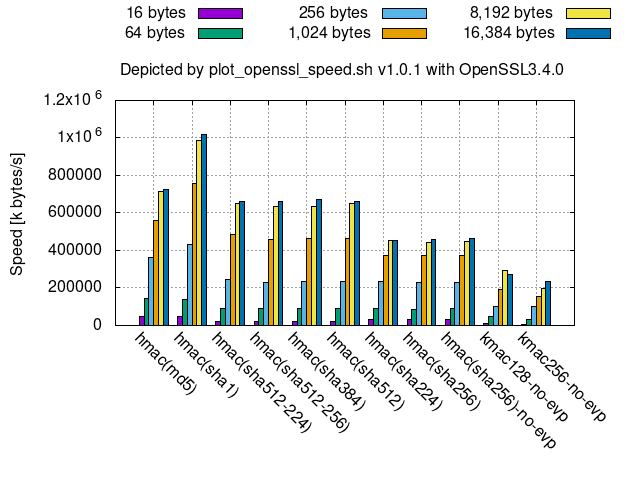
- For smaller messages, such as 16 bytes,
hmac(sha256)and its truncated versions are faster thanhmac(sha512)and its truncated versions, likewise to the hash functions. - All these hash-(or Keccak-)based MACs are slower than
AES-*-GCMincipher128-256.png.- This means that GMAC, a special case of GCM to be used as a block-cipher-based MAC, using AES is faster than them since GMAC is faster than GCM.
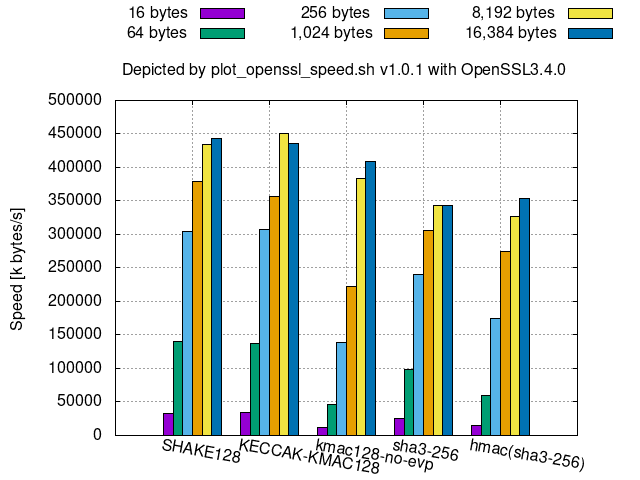
The followings are speed comparisons among some Keccak-derived algorithms.
128-bit security Keccak-derived algorithms:
256-bit security Keccak-derived algorithms:
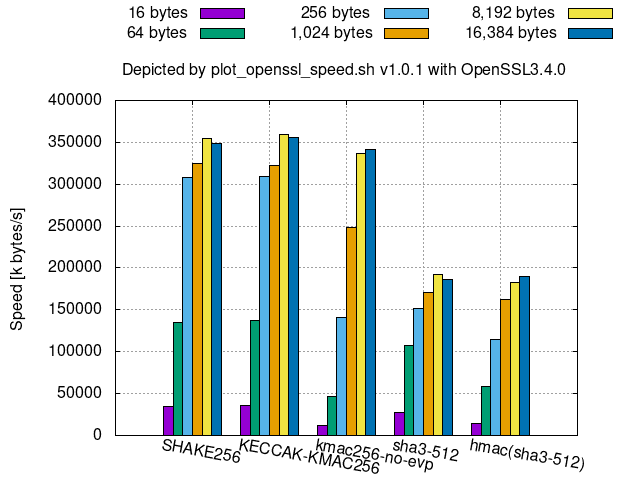
KMACkeyed-hash is available instead ofhmac(sha3-*)since SHA-3 resists length-extension attacks, thoughKMACcan be slower thanhmac(sha3-*)for smaller message sizes, especially for smaller bit securities, such as 128 bits.KECCAK-KMAC*in OpenSSL is aKMACthat omits key processing.- Hence, its speed is almost the same as
SHAKE*.
- Hence, its speed is almost the same as
Edit the crypt-algorithm names and the PNG file names in the functions plot_graph_asymmetric() and plot_graph_symmetric() in
./plot_openssl_speed_all.sh whereas the former function is for asymmetric-key cryptosystems and the latter is for symmetric-key cryptosystems.
For example, the follows line saves a graph of measurement results of all the supported eddsa and ecdsa digital signatures in ed_ecdsa.png, its plot data in ed_ecdsa.dat, and their measurement logs in eddsa.log and ecdsa.log, respectively:
${PLOT_SCRIPT} -o "./${GRA_DIR}/ed_ecdsa.png" eddsa ecdsaAs you can see from the above, plot_openssl_speed_all.sh is a wrapper of ${PLOT_SCRIPT} (plot_openssl_speed.sh), and you can directly run the openssl command in the PATH as follows:
./plot_openssl_speed.sh -o "./tmp/default_openssl_1.1.1f/graphs/ed_ecdsa.png" eddsa ecdsawhere:
- '_1.1.1f' to be changed to the version of the openssl command in PATH.
- cf.
./plot_openssl_speed.sh -hfor the usage.
One can specify the openssl command, which is not in the PATH, with -p option as follows:
./plot_openssl_speed.sh -p "./tmp/openssl-3.0.7/apps/openssl" -o "./tmp/openssl-3.0.7/graphs/ed_ecdsa.png" eddsa ecdsaIf it encounters the following errors:
error while loading shared libraries:
symbol lookup error:
add the path to the shared library to LD_LIBRARY_PATH (DYLD_LIBRARY_PATH for macOS) as follows:
(export LD_LIBRARY_PATH=./tmp/openssl-3.0.7${LD_LIBRARY_PATH:+:$LD_LIBRARY_PATH}; ./plot_openssl_speed.sh -p "./tmp/openssl-3.0.7/apps/openssl" -o "./tmp/openssl-3.0.7/graphs/ed_ecdsa.png" eddsa ecdsa)The command ldd (or otool -L on macOS) shows a list of used shared libraries.
$ ldd ./tmp/openssl-3.0.7/apps/openssl
        libssl.so.3 => not found
        libcrypto.so.3 => not found
To run the openssl command under a working folder ${TMP}/<openssl-type> where <openssl-type> includes <oqsprovider_type>:
Run the following script once right under the ${TMP}/<openssl-type> folder:
../../utils/set_oqsprovider.shThen, run ../../plot_openssl_speed.sh -p openssl/apps/openssl in the same folder as follows:
../../plot_openssl_speed.sh -p openssl/apps/openssl -s 1 -o mldsa44_and_mlkem512.png mldsa44 mlkem512The above scripts also save data, corresponding to the graphs, in files that replaced .png with .dat in the PNG file names. You can create a new data file by combining the contents of them or by editing them.
You can plot the graph of the edited data file by specifying no crypt-algorithms to the argument (without running openssl speed):
./plot_openssl_speed.sh -d "data_file_to_graph" -o "output_graph_file.png"The data file name is given by any of the following ways:
- With
-doption - Without
-doption:- If
-o "output_graph_file.png"is given,output_graph_file.datis used as the data file. - Otherwise,
graph.datis used as the data file regarding that the default filegraph.pngis given to-o.
- If
You can find the default file names in the 'Usage' shown by:
plot_openssl_speed.sh -hIf
data_file_to_graphis different fromoutput_graph_file.dat, which is the file name replaced.pngwith.datinoutput_graph_file.png, thedata_file_to_graphis copied to theoutput_graph_file.datso that anyone can know thatoutput_graph_file.datis the data file ofoutput_graph_file.png.
- The data separator is (not comma but) space.
- Crypt-algorithm names shall be placed only in the first column.
- While
openssl speedoutputs some of the crypt-algorithm names in multiple columns, the data file generated byplot_openssl_speed.shautomatically aligns them only in the first column.
- While
- The lines starting with # are comments.
- Do not include double or more consecutive blank lines (after removing the comment lines).
- Or specify the data block to use with the gnuplot index.
- For v0.0.0, the number of columns shall be the same throughout a data file except for comment-and-blank lines.
- The versions 1.0.0 and newer allow the combination of the following "sig_ver_keygen" and "dec_enc_keygen_dh" TABLE_TYPE's as a "sig_enc_mix" TABLE_TYPE.
plot_openssl_speed.shignores and skips consecutive different TABLE_TYPE crypt-algorithms.
For symmetric-key cryptographies, hash functions, HMACs.
Example:
# type            16 bytes     64 bytes    256 bytes   1024 bytes   8192 bytes  16384 bytes
aes-128-ccm     202973.97k   588256.58k  1065011.71k  1314283.52k  1346633.73k  1381728.26k
hmac(sha512)     23408.12k    90165.99k   249721.98k   538953.37k   756375.73k   782985.02k
sha256           30840.78k    88357.72k   199311.27k   292801.60k   334301.56k   319321.27k
This TABLE_TYPE is available in v1.0.0 and newer for digital signatures.
Fill keygen/s columns of no data with 0.
In data-plot mode,
plot_openssl_speed.shwith-l TABLE_TYPEoption (available in v1.0.0 or newer) accepts the right most consecutive blank columns while without the option it guesses the TABLE_TYPE with the number of columns.
Example:
# asymmetric_algorithm        sign/s   verify/s   keygen/s
ecdsa(nistp256)              42359.0    15555.0          0
EdDSA(Ed25519)               29607.0     9474.0          0
rsa3072                        553.0    28153.0          0
rsa4096                        268.0    16543.0          0
mldsa44                      14595.0    40081.0    30223.2
This TABLE_TYPE is available in v1.0.0 or newer for DH key exchanges and
symmetric-key cryptographies except digital signatures.
Fill the columns of no data with 0.
In data-plot mode,
plot_openssl_speed.shwith-l TABLE_TYPEoption (available in v1.0.0 or newer) accepts the right most consecutive blank columns while without the option it guesses the TABLE_TYPE with the number of columns.
Example:
# asymmetric_algorithm         dec/s      enc/s   keygen/s       dh/s
rsa3072                        593.0    26836.0          0          0
rsa4096                        254.0    15503.0          0          0
ecdh(nistp256)                     0          0          0    19963.0
ecdh(X25519)                       0          0          0    30287.0
mlkem512                    114039.0   100366.0    77138.0          0
This TABLE_TYPE is available in v1.0.0 and newer for comparison among "sig_ver_keygen" and "dec_enc_keygen_dh" algorithms.
Example:
# asymmetric_algorithm        sign/s   verify/s   keygen/s
mldsa44                      14595.0    40081.0    30223.2
mldsa65                       8686.0    22795.0    19578.0
mldsa87                       7104.0    14383.0    12445.5
#
# asymmetric_algorithm         dec/s      enc/s   keygen/s       dh/s
mlkem512                    114039.0   100366.0    77138.0          0
mlkem768                     73753.0    71901.0    52051.5          0
mlkem1024                    49803.0    52377.8    43771.7          0
For v0.0.0 and digital signatures. It graphs the values in the fourth and fifth columns.
Plotting processing times has the following drawbacks: It is hard to distinguish the fastest algorithm when the comparison set includes slow algorithms. Even worse, small processing times are sometimes quantized to 0 or the minimal unit.
Example:
#                   sign      verify     sign/s verify/s
rsa4096             0.003922s 0.000061s   255.0  16471.0
dsa2048             0.000296s 0.000219s  3383.0   4557.0
ecdsa(nistp256)     0.0000s   0.0001s   43201.0  15221.0
EdDSA(Ed25519)      0.0000s   0.0001s   24010.0   8805.0
For v0.0.0 and Diffie-Hellman key exchange. It graphs the values in the third column.
Example:
#               op          op/s
ffdh4096        0.0129s     77.8
ecdh(nistp256)  0.0000s  20643.0
./data_from_web/with_webdata.sh -d <filename>.dat command reads this data file where:
- The data separator is (not comma but) space.
- The lines starting with # are comments.
- Do not include double or more consecutive blank lines (after removing the comment lines).
- Or specify the data block to use with the gnuplot index.
Example:
# x min      25%        50%        75%        max (k|s|v|d|e):name(source)             parameter
# x dummy    25%        50%        75%      dummy (k|s|v|d|e):'25/50/75% are given'    parameter
# x dummy  dummy       mean      dummy      dummy (k|s|v|d|e):'only the mean is given' parameter
  1 0      76090      86116     134869     134869 s:dilithium2aes(ebats-ryzen7)           2
  2 0      42770      42987      43140      43140 v:dilithium2aes(ebats-ryzen7)           2
  3 0      33094      33541      33924      33924 k:dilithium2aes(ebats-ryzen7)           2
  4 0      74124      74124      74124      74124 s:mldsa44(liboqs0.10.1)                44
  5 0    31584.7    31584.7    31584.7    31584.7 v:mldsa44(liboqs0.10.1)                44
  6 0    35220.3    35220.3    35220.3    35220.3 k:mldsa44(liboqs0.10.1)                44
  7 0     333013     333013     333013     333013 s:ML-DSA-44(pq-sig-zoo)                44
  8 0     118412     118412     118412     118412 v:ML-DSA-44(pq-sig-zoo)                44
Each column shows:
- 1st column:
x-axisto plot the data in the line.
- 2nd to 6th columns:
- Cycles to execute the algorithm of
min,25%,50%/mean,75%,maxvalues, respectively. - ECRYPT Benchmarking provides
25%,50%,75%values. Set them there and put dummy values to min and max. - If only the mean value is available, set it to
50%/meanand put dummy values in the other columns.
- Cycles to execute the algorithm of
- 7th column:
- The name to be shown on the x-axis.
- The leading
k:,s:,v:,e:,d:in the name represent the operation type of keygen, sign, verification, encryption/encapsulation, decryption/decapsulation, respectively. - The string in
()represents the data source.
- 8th column:
- Parameter extracted from the name.
- While this column is for sorting lines,
with_webdata.shdoes not use it as of v1.0.0. So, you may put a dummy value (but not blank) here.
$ awk '/^PRETTY/ {print substr($0,14,length($0)-14)}' /etc/os-release

"Ubuntu 20.04.4 LTS"
$ uname -srm
Linux 5.10.102.1-microsoft-standard-WSL2 x86_64$ awk '{if($1$2 == "modelname"){$1="";$2="";$3=""; model=substr($0,4)}; if($1$2 == "cpuMHz") {max=$4/1000; printf "%s (%.2fGHz)\n",model,max; exit;}}' /proc/cpuinfo
Intel(R) Core(TM) i7-10810U CPU @ 1.10GHz (1.61GHz)Version and configurations of the openssl command in the PATH:
$ openssl version -a

OpenSSL 1.1.1f  31 Mar 2020
built on: Mon Jul  4 11:24:28 2022 UTC
platform: debian-amd64
options:  bn(64,64) rc4(16x,int) des(int) blowfish(ptr)
compiler: gcc -fPIC -pthread -m64 -Wa,--noexecstack -Wall -Wa,--noexecstack -g -O2 -fdebug-prefix-map=/build/openssl-51ig8V/openssl-1.1.1f=. -fstack-protector-strong -Wformat -Werror=format-security -DOPENSSL_TLS_SECURITY_LEVEL=2 -DOPENSSL_USE_NODELETE -DL_ENDIAN -DOPENSSL_PIC -DOPENSSL_CPUID_OBJ -DOPENSSL_IA32_SSE2 -DOPENSSL_BN_ASM_MONT -DOPENSSL_BN_ASM_MONT5 -DOPENSSL_BN_ASM_GF2m -DSHA1_ASM -DSHA256_ASM -DSHA512_ASM -DKECCAK1600_ASM -DRC4_ASM -DMD5_ASM -DAESNI_ASM -DVPAES_ASM -DGHASH_ASM -DECP_NISTZ256_ASM -DX25519_ASM -DPOLY1305_ASM -DNDEBUG -Wdate-time -D_FORTIFY_SOURCE=2
Version and configurations of openssl-3.0.5:
$ (export LD_LIBRARY_PATH=./tmp/openssl-3.0.5${LD_LIBRARY_PATH:+:$LD_LIBRARY
_PATH}; ./tmp/openssl-3.0.5/apps/openssl version -a )

OpenSSL 3.0.5 5 Jul 2022 (Library: OpenSSL 3.0.5 5 Jul 2022)
built on: Wed Jul 13 10:43:30 2022 UTC
platform: linux-x86_64
options:  bn(64,64)
compiler: gcc -fPIC -pthread -m64 -Wa,--noexecstack -Wall -O3 -fstack-protector-strong -fstack-clash-protection -fcf-protection -DOPENSSL_USE_NODELETE -DL_ENDIAN -DOPENSSL_PIC -DOPENSSL_BUILDING_OPENSSL -DNDEBUG
$ gnuplot -V
gnuplot 5.2 patchlevel 8$ uname -srm
Darwin 21.5.0 x86_64$ sysctl machdep.cpu.brand_string
machdep.cpu.brand_string: Intel(R) Core(TM) i9-9980HK CPU @ 2.40GHz$ openssl version -a
LibreSSL 2.8.3
options: bn(64,64) rc4(16x,int) des(idx,cisc,16,int) blowfish(idx) $ gnuplot -V
gnuplot 5.4 patchlevel 3Reply from the servers where ./data_from_web/with_webdata.sh retrieves data either delayed or did not respond.
Retry the same script after a while or after commenting out the following line in plot_openssl_speed_all.sh if the necessity of the data is low:
(cd "${GRA_DIR}" && { ${PLOT_WITH_WEB_DATA} || true;})Import the missing Python modules.
If yaml and tabulate in oqs-template/generate_oid_nid_table.py are missing, run:
pip install pyyaml tabulateThen run the same command that caused the above error again.
Specify the path to the provider, oqsprovider.so for oqs-provider, by either OPENSSL_MODULES environment variable or -provider-path option before -provider.
Example of a command line to run in a tmp/openssl-<ver>-oqsprovider<ver>-liboqs<ver> dir, which was generated by plot_openssl_speed_all.sh:
./openssl/apps/openssl list -kem-algorithms -provider-path ./_build/lib/ -provider oqsproviderEither add the folder of libssp-0.dll to the Windows environment PATH, or run the following commands on a WSL Debian/Ubuntu terminal:
sudo apt install gcc-mingw-w64-x86-64
bash
export MINGW_GCC_VER=$(/usr/bin/x86_64-w64-mingw32-gcc-posix --version | awk '/x86_64-w64-mingw32-gcc-posix/ {print substr($3,1,index($3,"-")-1)}')
cp -p  "/usr/lib/gcc/x86_64-w64-mingw32/${MINGW_GCC_VER}-posix/libssp-0.dll" .
exitChange the options and/or crypt-algorithms given to openssl speed.
Some versions of openssl commands do not support them.
Check if your security software displays a message that blocks the execution. If so, unblock it and run the same script again.
- [kec17] TeamKeccak "Is SHA-3 slow?", 2017.6
- [pq-sig-zoo] "Post-Quantum signatures zoo"
- [ebats] "eBATS: ECRYPT Benchmarking of Asymmetric Systems"